

Architecture#
Structured architecture for campaign-scale docking
ProDock is designed around one central idea: docking is not just a single run, but a reproducible campaign spanning many receptors, many ligands, and one or more docking engines. The architecture separates execution, analysis, and persistence so workflows stay scalable, queryable, and reproducible.
Why the architecture looks like this#
ProDock is built for workflows that grow beyond a single receptor–ligand test case. At that scale, a folder-only approach becomes difficult to maintain.
The architecture is meant to solve three recurring problems:
File-system fragility
Logs, poses, converted structures, and interaction outputs become scattered across engines and folders, making reuse difficult.
Relational complexity
Real campaigns create many-to-many relationships across receptors, ligands, engines, and pose ranks that flat files do not model well.
Retrospective analysis
Consensus scoring, residue filtering, interaction queries, and campaign reporting should be possible later without rerunning the heavy workflow.
Workflow architecture#
Structure
Obtain and normalize structural inputs and conversions.
Preprocess
Prepare receptors, ligands, and docking boxes.
Dock
Run one or more engines over many receptor–ligand pairs.
Postprocess
Extract scores, crawl poses, and compute interactions.
Database
Persist campaign outputs for later querying and reuse.
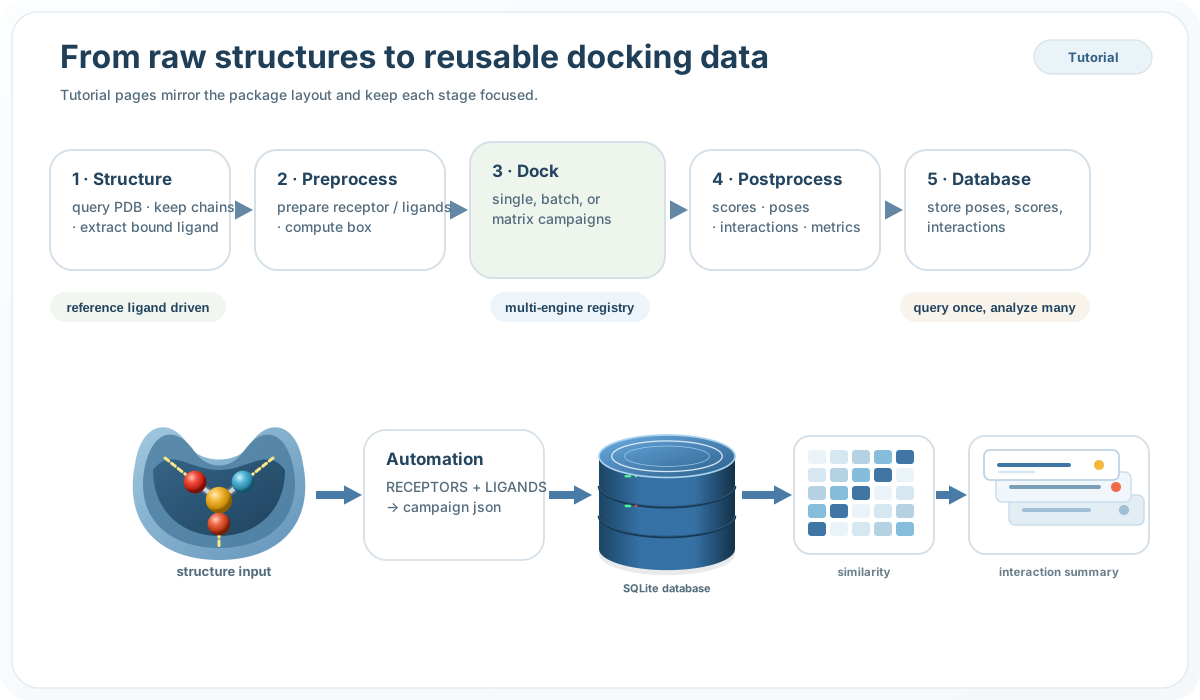
This stage order matters because it separates heavy generation work from later analysis. Once a campaign has finished, most downstream questions should become query problems rather than rerun problems.
Package dependency map#
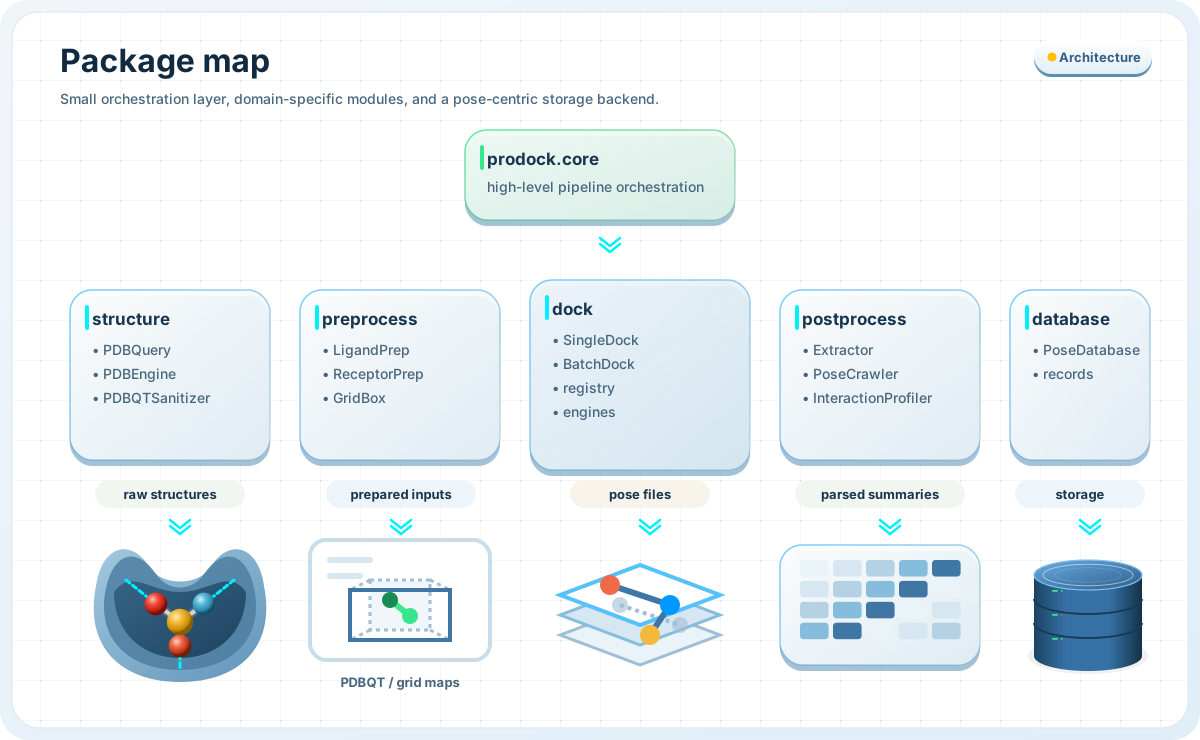
The package layout mirrors the workflow:
structurehandles intake and low-level conversionpreprocessprepares receptors, ligands, and box definitionsdockruns single or batch docking through registered enginespostprocessparses logs, crawls poses, and computes interactionsdatabasestores and queries campaign outputscoreand automation entry points tie the layers together
This modular organization allows two usage styles:
use the entire stack end-to-end,
or reuse one stage independently inside a notebook or script.
Many-to-many campaign model#
Core architectural paradigm
ProDock models docking as a many-to-many campaign across receptors, ligands, engines, and pose ranks rather than as isolated output files.
In this model:
one receptor can be docked against many ligands,
one ligand can be tested across many receptors,
one receptor–ligand pair can be evaluated by many engines,
one receptor–ligand–engine combination can produce many ranked poses.
That is why ProDock treats the pose as the central stored result. Scores, interaction rows, and later analyses all attach naturally to that level.
Relational database architecture#
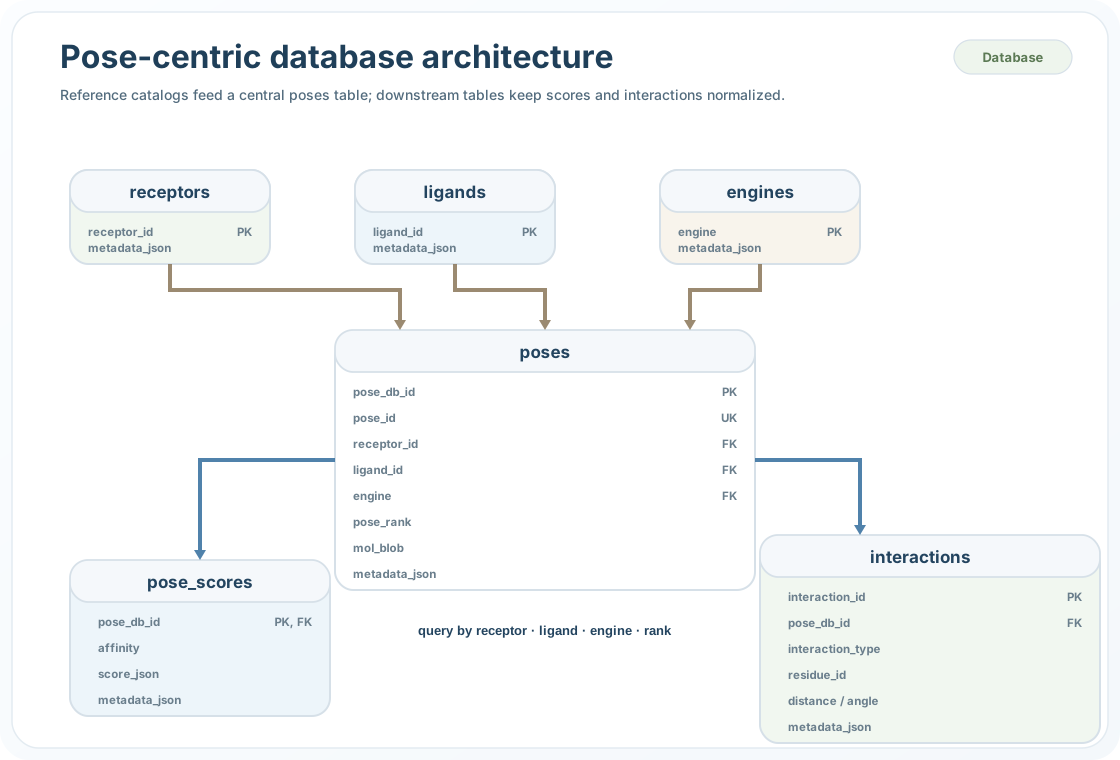
The database is normalized so that receptor, ligand, and engine identifiers are stored once, while pose-specific and interaction-specific records remain linked through stable keys.
This gives three practical benefits:
The practical result is that ProDock can answer questions such as:
which ligands produce the best-ranked poses for one receptor,
which poses satisfy both affinity and residue-contact constraints,
how interaction fingerprints vary across engines,
how one campaign compares across many receptor–ligand pairs.
Execution and analysis are separated#
Execution layer
- prepare receptors
- prepare ligands
- run docking engines
- generate logs and poses
Analysis layer
- extract score tables
- crawl pose trees
- compute interactions
- query stored SQLite records
A central architectural rule in ProDock is that execution is decoupled from analysis.
Heavy stages generate artifacts. Later stages transform those artifacts into tables, summaries, and persistent records. Once stored, downstream work becomes lighter, more reproducible, and easier to query.
System summary#
See also#
Preprocess — prepare receptors, ligands, and docking boxes
Dock — run single and batch docking workflows
Postprocess — parse scores, crawl poses, and compute interactions
Database — store and query campaign outputs in SQLite