Database#
Database architecture#
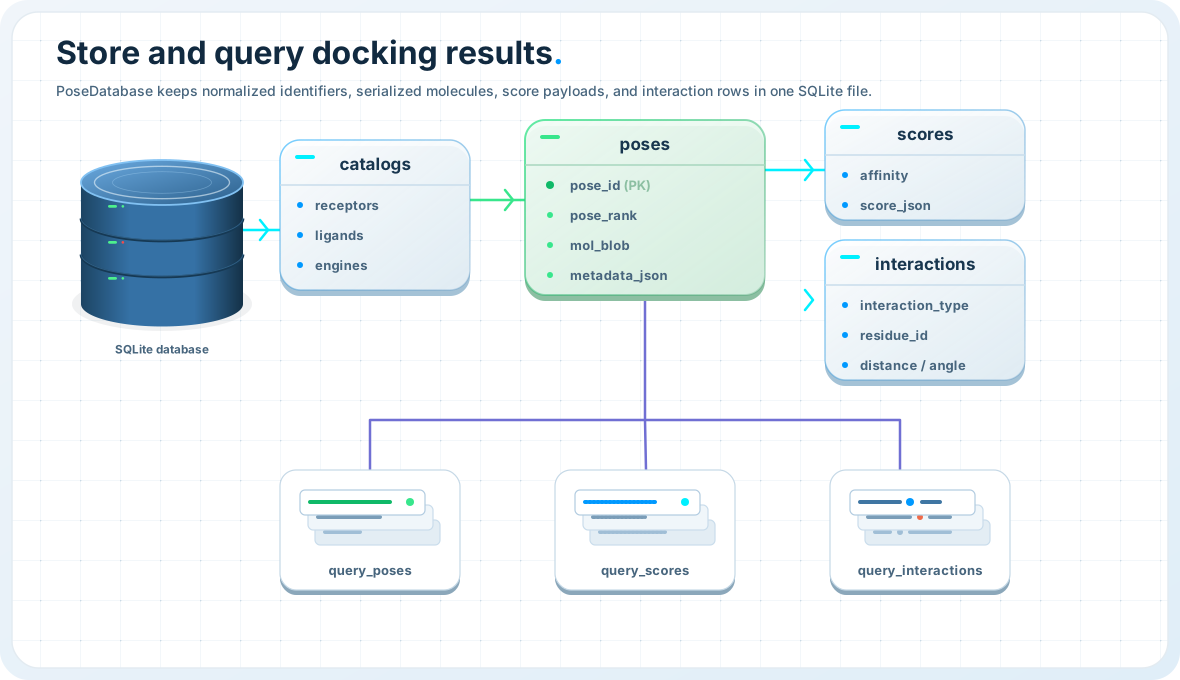
ProDock stores docking campaigns in a compact normalized SQLite schema. The main design idea is simple:
write results once,
query them many times later.
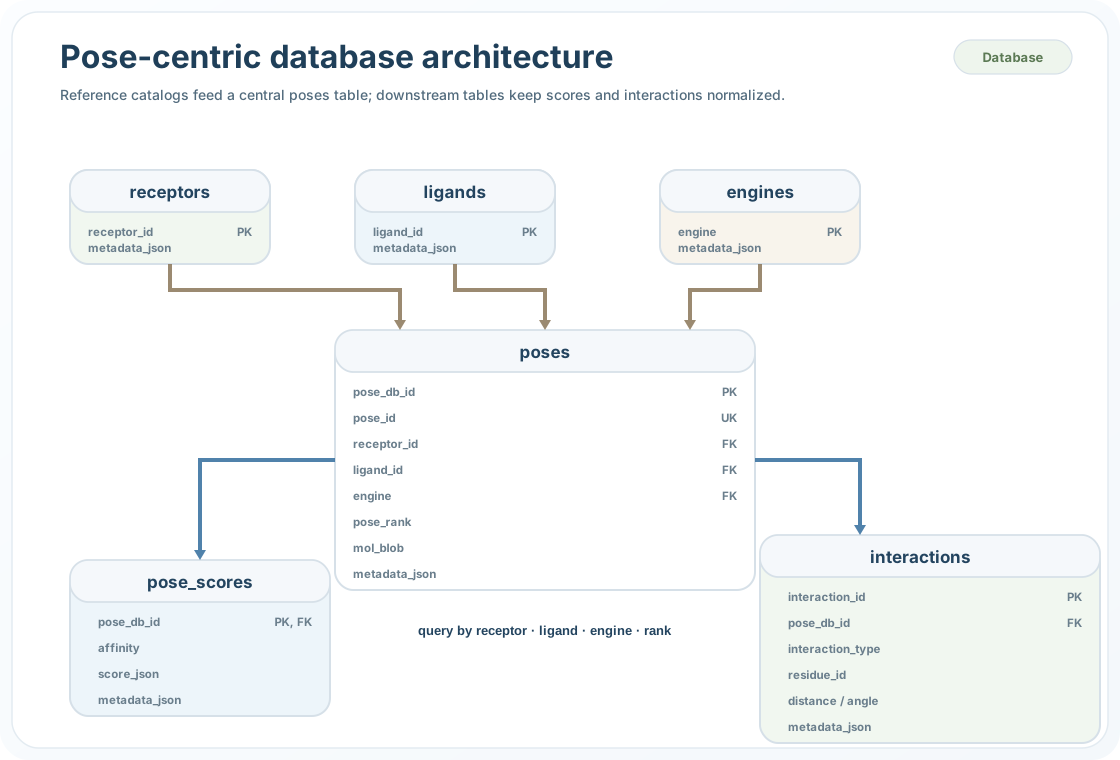
The schema is organized so that receptor, ligand, and engine identifiers are stored once, while pose-specific, score-specific, and interaction-specific records remain linked through stable pose keys.
This gives three practical benefits:
compact storage across many receptors, ligands, and engines,
easy reconstruction of analysis tables,
consistent filtering across identity, score, and interaction layers.
The database is organized into three layers:
dimension tables for receptors, ligands, and engines,
pose records for pose identity, serialized molecules, and metadata,
analysis tables for score payloads and residue-level interactions.
In practice, this means one campaign can be explored later without reparsing engine logs, reconverting pose files, or recomputing interaction summaries.
Writer and reader
The database layer is split into one writer API and one read/query API.
The two main public objects are:
PoseDatabase— create the schema and insert or update campaign dataPoseQuery— open an existing database and run analysis-friendly queries
This separation keeps workflow generation and downstream analysis cleanly decoupled.
Pose identity#
A stored pose can be addressed in two ways:
pose_db_id— internal SQLite integer primary keypose_id— optional stable external id such as"1M17__erlotinib__qvina__pose1"
If no external pose_id is stored, a pose is still uniquely identified by:
(receptor_id, ligand_id, engine, pose_rank)
This makes the schema robust both for automated inserts and for human-readable campaign exports.
Write campaign data#
PoseDatabase
Store pose tables, score rows, molecules, and interactions in one campaign database.
Use PoseDatabase when you already have a pose dataframe from docking or
postprocessing and want to persist it for later analysis.
Minimal write example:
from prodock.database import PoseDatabase

db = PoseDatabase("poses.sqlite")
db.insert_dataframe(pose_dataframe)
The dataframe is expected to contain the core pose columns:
receptor_idligand_idenginepose_rankaffinitymol
A one-step construction pattern is also available:
from prodock.database import PoseDatabase

db = PoseDatabase.from_dataframe(
    "poses.sqlite",
    pose_dataframe,
)
If interaction payloads are already available, they can be stored at import time:
db.insert_dataframe(
    pose_dataframe,
    interactions_by_pose=interactions_by_pose,
    replace=True,
    replace_interactions=True,
)
Query stored campaigns#
PoseQuery
Open an existing database and query poses, scores, and interactions through a read-focused API.
Use PoseQuery after a campaign has already been stored. By default, it
opens the database in read-only mode.
Typical query patterns include:
pose tables filtered by receptor, ligand, engine, or rank,
score tables without loading molecules,
exact retrieval of one stored pose,
interaction-aware filtering,
interaction summaries and fingerprint matrices,
campaign-level summaries.
Basic examples:
from prodock.database import PoseQuery

q = PoseQuery("poses.sqlite")

poses = q.poses(
    receptor_id="1M17",
    engine="qvina",
    as_dataframe=True,
)

scores = q.scores(
    receptor_id="1M17",
    top_rank=3,
    as_dataframe=True,
)

print(poses[["pose_id", "pose_rank", "affinity"]].head())
print(scores[["pose_id", "affinity"]].head())
Retrieve one exact pose:
pose = q.pose(
    receptor_id="1M17",
    ligand_id="erlotinib",
    engine="qvina",
    pose_rank=1,
    include_interactions=True,
    interaction_mode="summary",
)

print(pose)
Interaction querying#
One advantage of keeping interactions in the same schema is that pose queries can also filter by interaction content.
from prodock.database import PoseQuery

q = PoseQuery("poses.sqlite")

selected = q.poses(
    receptor_id="1M17",
    interaction_type="Hydrophobic",
    residue_id="LEU23.A",
    as_dataframe=True,
)

print(selected[["pose_id", "affinity"]])
Compact summaries can be rebuilt directly from stored interaction rows:
summary = q.interaction_summary(
    receptor_id="1M17",
    return_by="pose_id",
)

print(summary)
Detailed event payloads can also be reconstructed:
details = q.interaction_details(
    receptor_id="1M17",
    return_by="pose_key",
)

print(details)
Fingerprint matrices are also available:
fp = q.fingerprint(
    receptor_id="1M17",
    mode="binary",
    index_by="pose_key",
)

print(fp.head())
Minimal end-to-end example#
Write once, query later
from prodock.database import PoseDatabase, PoseQuery

# Step 1: write campaign results
db = PoseDatabase("poses.sqlite")
db.insert_dataframe(
    pose_dataframe,
    interactions_by_pose=interactions_by_pose,
    replace=True,
    replace_interactions=True,
)

# Step 2: reopen with the read/query API
q = PoseQuery("poses.sqlite")

best = q.poses(
    receptor_id="1M17",
    top_rank=1,
    include_interactions=True,
    interaction_mode="summary",
    as_dataframe=True,
)

fp = q.fingerprint(
    receptor_id="1M17",
    mode="binary",
    index_by="pose_key",
)

summary = q.summary()

print(best.head())
print(fp.head())
print(summary.head())
See also#
Database API — full reference for
PoseDatabaseandPoseQueryPostprocess API — build pose tables and interaction payloads before database import
Postprocess — postprocess docking outputs into reusable tables and summaries