Dock#
Docking architecture#
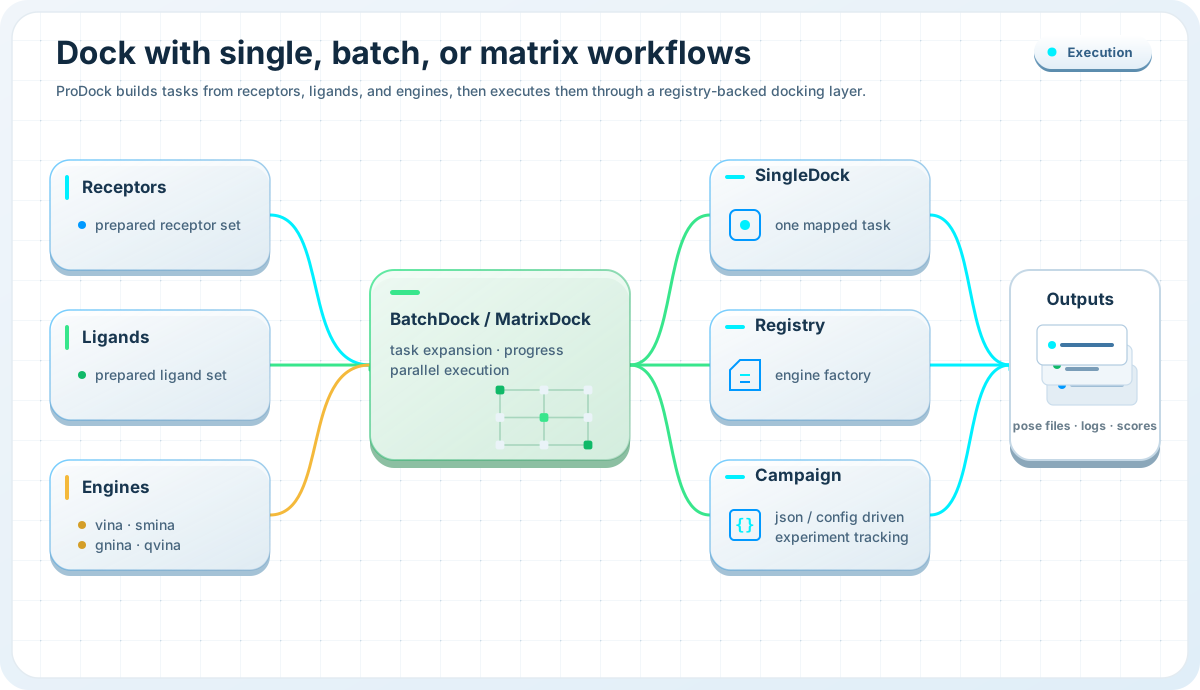
The docking layer is built around one simple split:
SingleDockfor one run,BatchDockfor many runs,config objects for reproducible campaign definitions,
a backend registry that maps engine names to implementations.
By default, the registry exposes these engines:
vinasminagninaqvinaqvina-w
This design keeps the public workflow stable even when the backend executable changes.
Single docking#
SingleDock
Run one receptor–ligand docking job through a fluent engine-agnostic interface.
Use SingleDock when you want to launch a single docking run directly
from Python.
Typical use cases include:
testing one ligand quickly,
comparing engines on one receptor–ligand pair,
prototyping box settings before launching a batch,
driving one run from a
SingleConfig.
from prodock.dock import SingleDock

result = (
    SingleDock("qvina")
    .set_receptor("protein.pdbqt", validate=True)
    .set_ligand("ligand.pdbqt")
    .set_box(
        center=(12.0, 5.5, -1.2),
        size=(18.0, 20.0, 16.0),
    )
    .set_out("dock_out.pdbqt")
    .set_log("dock.log")
    .run()
)

print(result.artifacts.out_path)
print(result.artifacts.log_path)
Autoboxing is also supported:
result = (
    SingleDock("vina")
    .set_receptor("protein.pdbqt")
    .set_ligand("ligand.pdbqt")
    .enable_autobox("ref_ligand.pdbqt", padding=4.0)
    .set_out("dock_out.pdbqt")
    .set_log("dock.log")
    .run()
)
Configuration-driven single runs are also available:
from prodock.dock import SingleDock, SingleConfig, Box

cfg = SingleConfig(
    engine="vina",
    receptor="protein.pdbqt",
    ligand="ligand.pdbqt",
    box=Box(
        center=(12.0, 5.5, -1.2),
        size=(18.0, 20.0, 16.0),
    ),
    out="dock_out.pdbqt",
    log="dock.log",
)

result = SingleDock.run_from_config(cfg)
print(result.artifacts.out_path)
Batch docking#
BatchDock
Normalize many docking jobs into tasks and execute them serially or in parallel.
BatchDock supports two input styles:
flat row-based batches with
DockRowreceptor-centric batches with
ReceptorSpec
This makes it suitable both for simple ligand lists and for larger multi-engine campaigns.
Flat row workflow:
from prodock.dock import BatchDock

rows = [
    {
        "id": "erlotinib",
        "receptor": "4WKQ.pdbqt",
        "ligand": "erlotinib.pdbqt",
        "center": [2.865, 193.257, 21.367],
        "size": [27.091, 27.091, 27.091],
    }
]

batch = BatchDock(engine="qvina", n_jobs=4)
results = batch.run(
    rows,
    out_dir="docked",
    log_dir="logs",
    exhaustiveness=8,
    n_poses=10,
)

print(results[0].success)
print(results[0].out_path)
Receptor-centric workflow:
from prodock.dock import BatchDock, ReceptorSpec, SoftwareSpec, LigandSpec, Box

receptors = [
    ReceptorSpec(
        id="4WKQ",
        receptor="4WKQ.pdbqt",
        box=Box(
            center=(2.865, 193.257, 21.367),
            size=(27.091, 27.091, 27.091),
        ),
        softwares=[
            SoftwareSpec(
                name="qvina",
                ligands=[
                    LigandSpec(id="erlotinib", ligand="erlotinib.pdbqt"),
                    LigandSpec(id="gefitinib", ligand="gefitinib.pdbqt"),
                ],
            )
        ],
    )
]

batch = BatchDock(n_jobs=4)
results = batch.run_receptors(
    receptors,
    out_dir="results/docked",
    log_dir="results/logs",
)

print(len(results))
Internally, batch execution works in two steps:
create normalized
DockTaskobjects,execute them with
run_tasks().
Each completed task returns a DockResult.
Configuration objects#
SingleConfig, BatchConfig, and campaign specs
Describe docking jobs as reusable config objects or JSON/YAML files.
The docking layer provides a small configuration model:
Boxfor center and sizeSingleConfigfor one runDockRowfor flat batch rowsLigandSpec,SoftwareSpec, andReceptorSpecfor receptor-centric layoutsBatchConfigfor full batch configuration
A batch can be created directly from configuration:
from prodock.dock import BatchDock

batch = BatchDock.from_config("batch.json")
results = BatchDock.run_from_config("batch.json")

print(len(results))
The configuration loader accepts dictionaries and JSON or YAML files, which makes it convenient for CLI-driven or reproducible campaign workflows.
Engine registry#
Engine registry
Resolve engines by name and keep the high-level API backend-agnostic.
The registry maps engine names to backend factories. This lets the public API
use stable engine keys such as "vina" or "qvina" without exposing
backend construction details.
Available engines can be listed at runtime:
from prodock.dock import available

print(available())
Custom backends can also be registered:
from prodock.dock import register

class MyBackend:
    ...

register("myengine", lambda: MyBackend())
This is useful when extending ProDock with new binaries or custom wrappers.
Minimal end-to-end example#
Dock one receptor against multiple ligands
from prodock.dock import BatchDock

rows = [
    {
        "id": "erlotinib",
        "receptor": "4WKQ.pdbqt",
        "ligand": "erlotinib.pdbqt",
        "center": [2.865, 193.257, 21.367],
        "size": [27.091, 27.091, 27.091],
    },
    {
        "id": "gefitinib",
        "receptor": "4WKQ.pdbqt",
        "ligand": "gefitinib.pdbqt",
        "center": [2.865, 193.257, 21.367],
        "size": [27.091, 27.091, 27.091],
    },
]

results = BatchDock(engine="qvina", n_jobs=2).run(
    rows,
    out_dir="results/docked",
    log_dir="results/logs",
    exhaustiveness=8,
    n_poses=10,
)

for r in results:
    print(r.job_id, r.success, r.out_path)
See also#
Dock API — full reference for
SingleDock,BatchDock, configs, and engine registryPreprocess — prepare ligands, receptors, and docking boxes before docking
Postprocess — analyze logs, poses, interactions, and metrics after docking