
Postprocess#
Score extraction#
Extractor
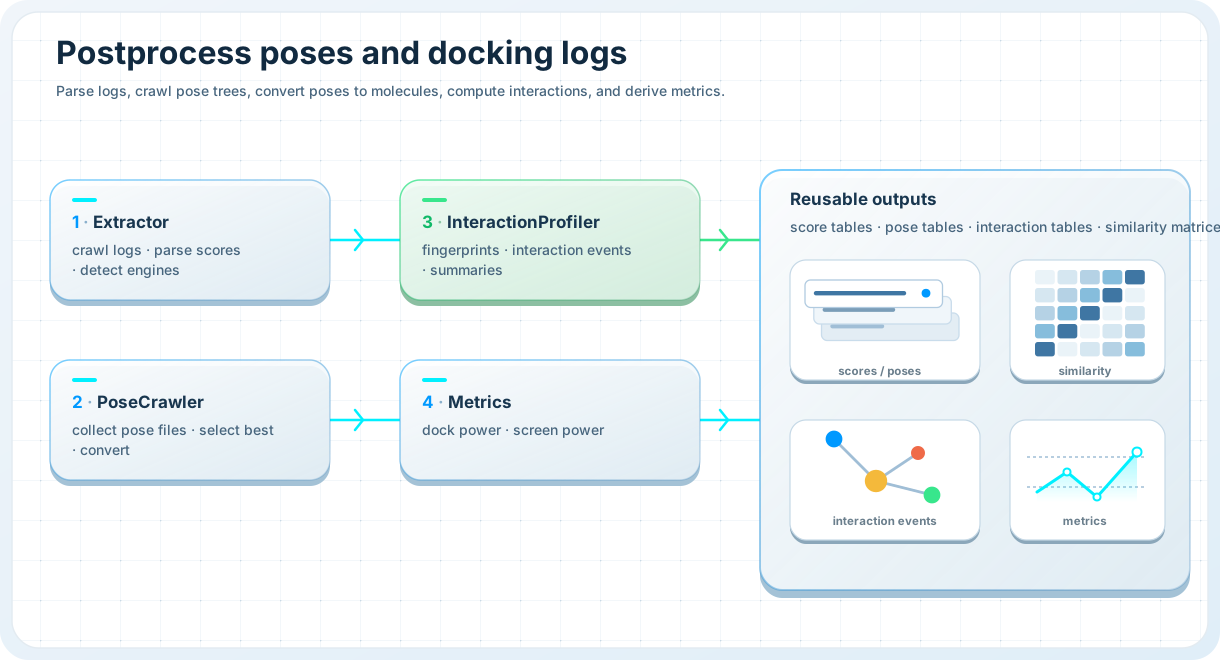
Parse docking logs or score tables and normalize them into canonical result tables.
Use extract_scores() for a simple one-call workflow, or
Extractor when you want more explicit control over layouts,
engine filtering, or recursive log discovery.
Typical use cases include:
parsing one or more engine-specific log trees,
extracting scores from mixed log or table inputs,
filtering extracted tables by engine,
building canonical score dataframes for downstream ranking.
from prodock.postprocess import extract_scores, Extractor

scores = extract_scores(
    roots=["logs"],
    layout="engine_tree",
)

extractor = Extractor(match_mode="exact")
vina_scores = extractor.extract_scores(
    roots=["logs"],
    engines=["vina"],
    layout="engine_tree",
)

print(scores.head())
print(vina_scores.head())
Pose crawling#
PoseCrawler
Discover pose files, summarize them, select best poses, and convert them into reusable structures.
Use PoseCrawler when you want to work with docked pose trees after a
campaign has finished.
Typical use cases include:
crawling a ProDock pose tree,
loading pose metadata into a dataframe,
selecting best-scoring poses per ligand or engine,
converting discovered
PDBQTposes intoSDF.
from prodock.postprocess.pose import PoseCrawler

crawler = PoseCrawler(["results"])

pose_df = crawler.crawl()
best_df = crawler.best()

mol_df = crawler.crawl_mols(
    backend="obabel",
    save_sdf=True,
)

sdf_paths = crawler.convert(
    out_dir="converted_sdf",
    overwrite=True,
)

print(pose_df.head())
print(best_df.head())
print(mol_df.head())
print(sdf_paths[:3])
Interaction profiling#
InteractionProfiler
Compute protein–ligand interaction fingerprints and pose-level summaries.
Use InteractionProfiler for one receptor–ligand workflow, or use
extract_pose_table_interactions() when you already have a pose dataframe
from PoseCrawler.
Typical use cases include:
running interaction analysis for one receptor and one ligand source,
profiling interactions for a full pose table,
saving pose-level interaction summaries,
preparing interaction results for database storage or notebook analysis.
from prodock.postprocess.pose import PoseCrawler
from prodock.postprocess.interaction.core import extract_pose_table_interactions

pose_table = PoseCrawler(["Data/testcase/post"]).crawl_mols()

receptor_map = {
    "1M17": "Data/testcase/post/1M17/receptor/1M17.pdb",
}

pose_result = extract_pose_table_interactions(
    poses=pose_table,
    receptor_pdb_by_id=receptor_map,
    progress=False,
    ultra_safe=True,
)

print(pose_result.merged_df.head())
print(pose_result.summary_df.head())
Single-run interaction analysis is also available:
from prodock.postprocess.interaction.core import InteractionProfiler

profiler = InteractionProfiler()
result = profiler.run(
    receptor_pdb="Data/receptor/egfr.pdb",
    ligands="ligands.sdf",
)

print(result.fingerprint_df.head())
print(result.interaction_df.head())
Metrics and evaluation#
DockEvaluator and ScreenEvaluator
Measure pose quality and virtual screening performance with reusable metric helpers.
Use DockEvaluator for RMSD-based pose evaluation and
ScreenEvaluator for ranking and enrichment metrics.
Typical use cases include:
comparing docked poses against a reference structure,
computing screening metrics from ranked score lists,
measuring early recognition with BEDROC,
using functional wrappers for quick analysis scripts.
from prodock.postprocess import DockEvaluator, ScreenEvaluator

dock_eval = DockEvaluator(engine="rdkit")
rmsd = dock_eval.rmsd("reference.sdf", "pose.sdf")

screen_eval = ScreenEvaluator(higher_is_better=False)

scores = [-10.0, -9.0, -8.0, -7.0, -2.0, -1.0]
labels = [1, 0, 1, 0, 0, 0]

print(rmsd)
print(screen_eval.auc_roc(scores, labels))
print(screen_eval.pr_auc(scores, labels))
print(screen_eval.enrichment_factor(scores, labels, fraction=0.1))
Convenience wrappers are also available directly from
prodock.postprocess, including rmsd_aligned, rmsd_min,
auc_roc, pr_auc, enrichment_factor, bedroc,
topn_success, and success_rate.
Minimal end-to-end example#
Postprocess a completed docking campaign
from prodock.postprocess import extract_scores
from prodock.postprocess.pose import PoseCrawler
from prodock.postprocess.interaction.core import extract_pose_table_interactions

# 1. Parse docking scores
score_df = extract_scores(
    roots=["logs"],
    layout="engine_tree",
)

# 2. Discover pose files and load molecules
pose_df = PoseCrawler(["results"]).crawl_mols()

# 3. Map receptor ids to receptor PDB files
receptor_map = {
    "1M17": "Data/testcase/post/1M17/receptor/1M17.pdb",
}

# 4. Compute interaction tables
pose_result = extract_pose_table_interactions(
    poses=pose_df,
    receptor_pdb_by_id=receptor_map,
    progress=False,
    ultra_safe=True,
)

print(score_df.head())
print(pose_result.summary_df.head())
See also#
Postprocess API — full reference for extraction, pose crawling, interaction analysis, and metrics
Structure API — low-level conversion and structure utilities used during postprocessing
Dock — continue from docking outputs into analysis workflows