Tutorial#
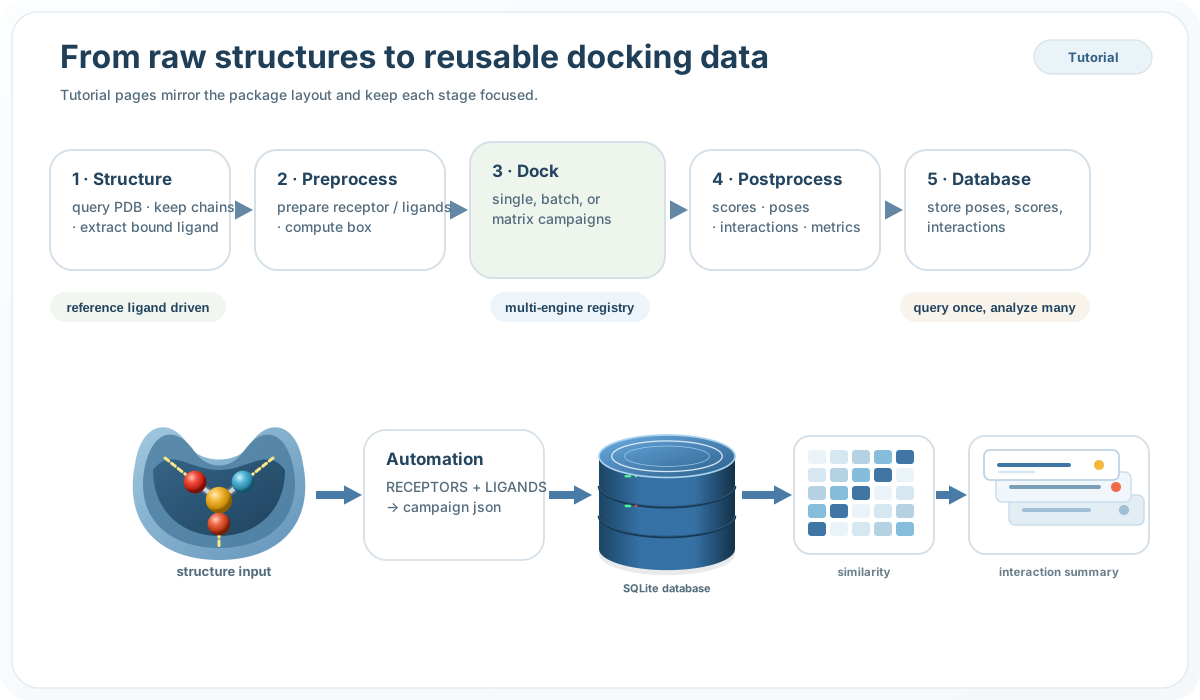
Follow the full ProDock path from structure collection to docking, interaction analysis, and database-backed reuse.
🧬 Structure
Query PDB entries, select chains, extract co-crystallized ligands, and save a clean receptor structure.
🧪 Preprocess
Prepare protein and ligand inputs, convert formats, and define docking boxes for downstream engines.
🚀 Dock
Run single jobs, batch runs, or receptor–ligand–engine campaigns with reusable configurations.
📊 Postprocess
Extract scores, crawl poses, profile interactions, compare fingerprints, and compute screening metrics.
🗄️ Database
Store poses, scores, and interactions once, then query them later for ranking, filtering, and reporting.
⚙️ Automation
Use ProDockPipeline with structured receptor and ligand dictionaries for end-to-end campaigns.
🧭 Start here
The tutorial is the workflow center of ProDock, designed for practical use rather than low-level API browsing.
🧪 Workflow order
Structure → Preprocess → Dock → Postprocess → Database → Automation
📦 Scope
Covers single runs, batch campaigns, multi-receptor and multi-ligand workflows, post-analysis, and persistent database-backed reuse.